Logo
immagine


..

  Designed and made by:


Logo digit image
Chemin de la Boisserette 14
CH-1208  Genève
TVA: 107 397 242


TeachLab Support


Download site


If you have problems starting the download, try by Firefox. 

In fact, Chrome and Edge consider .exe files dangerous and advise not to download them.

It is however possible to force the download with "Show more" and "Keep" options.


Si vous rencontrez des difficultés, téléchargez avec Firefox. 

E fait, Chrome et Edge considèrent fichier .exe comme dangereux et déconseillent de le télécharger. Il est cependant possible de procéder par "Afficher plus" et "Conserver".


In caso di difficoltà, scaricare con Firefox. 

Infatti, trattandosi di un file .exe, Chrome ed Edge lo considerano pericoloso a prescindere e sconsigliano il download. E' comunque possibile procedere con "Mostrare di più" e "Conservare".


  TeachLab and LanguageLab Setup - vers.  7.6.4.8

for Windows 8-10-11

No license required for installation nor for connections. For Win 7, require v. 7.5.2.4.

Unique installer teacher/student. For the teacher's PC select this option.

The update does not require previous uninstallation.
Don't download .NET Framework. The download proposed by Windows is not necessary.
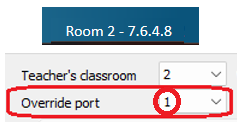

Se si aggiorna un docente con versione 7.6.2.1 o precedente, perderà i client. Per recuperarli entrare in Configurazione (Ctrl+click dx sullo sfondo > ultima voce) e impostare Override port=1

Nota: prima di aggiornare, ricordarsi il numero della Room perchè verrà chiesto durante l'installazione.

When upgrading a teacher from version 7.6.2.1 or earlier, if he loses the icons of his students, you can reconnect them by going to Settings (Ctrl+right-click on the background > last item) and set Override port=1, as shown in the image. Note: before upgrading, remember the Room number which will be required during reinstallation.


Si vous mettez à jour le compte d'un enseignant depuis la version 7.6.2.1 ou antérieure et que vous perdez ses clients, pour les récupérer, accédez à Configuration (Ctrl + clic droit sur l'arrière-plan > dernier élément) et définissez Override port=1, comme indiqué sur l'image. Note: Avant la mise à jour, notez le numéro de la salle pour pouvoir le saisir à nouveau.


pdf


scarica

TeachRecorder AI Setup for Windows 7-8-10-11 - vers. 7.6

Comparative recorder - requires LanguageLab license
 

pdf


scarica


LIMnet for Windows PCs - installer version 7.6.4.5

for Windows and Android clients


pdf


scarica


ScreenLab.apk v. 2.2.0 
for Android tablets and smartboards
per i master TeachLab, LanguageLab e LIMnet.


                   International support: +41 22 849 8383 - email: support@teachlab.ch 
                        Assistenza per l'Italia: + 39 339 72 84 737 - email: support@teachlab.com


scarica